Thymeleaf 표현식과 문법
✒️ 2025-06-24 17:44 내용 수정
th 네임 스페이스
- 사용 시 문서에 thymeleaf의 th 속성 사용을 위한 네임 스페이스를 선언한다.
- th 속성들은 Thymeleaf 전용 속성으로 브라우저는 인식하지 않는다.
<html lang="en" xmlns:th="http://www.thymeleaf.org">
표현식
1. 변수 표현식 ${}과 *{}
${...}: JavaScript나 JSP의 EL에서도 볼 수 있는 기본적인 변수 표현식이다.- 서버로부터 받은 값을 그대로 출력할 때 사용한다.
<!-- member의 이름 출력 -->
<p th:text="${member.name}"></p>
*{...}: 선택 변수 표현식으로, th object 사용 시Model로 받은 데이터 내의 한 객체를 지정해 객체 내의 속성을 접근할 때 사용한다.- 예시에서
*{name}은${member.name}과 같다.
- 예시에서
<!-- member.name, member.email -->
<div th:object="${member}">
	<p th:text="*{name}">
	<p th:text="*{email}">
</div>
2. URL 표현식 @{}
- Thymeleaf에서 URL을 표현할 때 사용한다.
@{/...}: 절대경로로, root 경로를 자동으로 추가해준다.@{...}: 상대경로
<a href="boardList.html" th:href="@{/board/list}">board</a>
- 데이터를 사용하여 두 가지 방법으로 동적으로 경로를 설정할 수 있다.
@{'문자열' + ${변수}}조합으로 설정한다.@{/path/{var}(var=${data})}로 설정한다.
<!-- /order/1 -->
<a th:href="@{'/order/' + ${id}}">주문 상세로 이동</a>

<!-- bno 값을 path variable에 넣기 -->
<a href="board.html" th:href="@{/board/{bno}/read(bno=${bno})}">link</a>
- parameter(query string)를 포함할 땐
@{/path(key=${value}, key2=${value2})}로 작성한다./path?key=value&key2=value2로 URI가 작성된다.
<!-- 파라미터나 중간에 경로를 포함한 URL 생성 가능 -->
<a href="board.html" th:href="@{/board/read(bno=${bno}, type='L')}">read</a>
3. 텍스트 표현식 #{}
- 국제화 지원을 위한 표현식이다.
- 다국어 지원을 위한 텍스트를 출력할 때 사용한다.
messages.properties파일에 표현식 내의 key인welcome과 대응되는 값을 가져와 출력한다.
<p th:text="#{welcome}">Welcome</p>
<p th:text="#{greeting}">Greeting</p>
설정 및 예제
application.properties에 message의 encoding type을 UTF-8로 설정한다.
# application.properties
spring.message.encoding=UTF-8
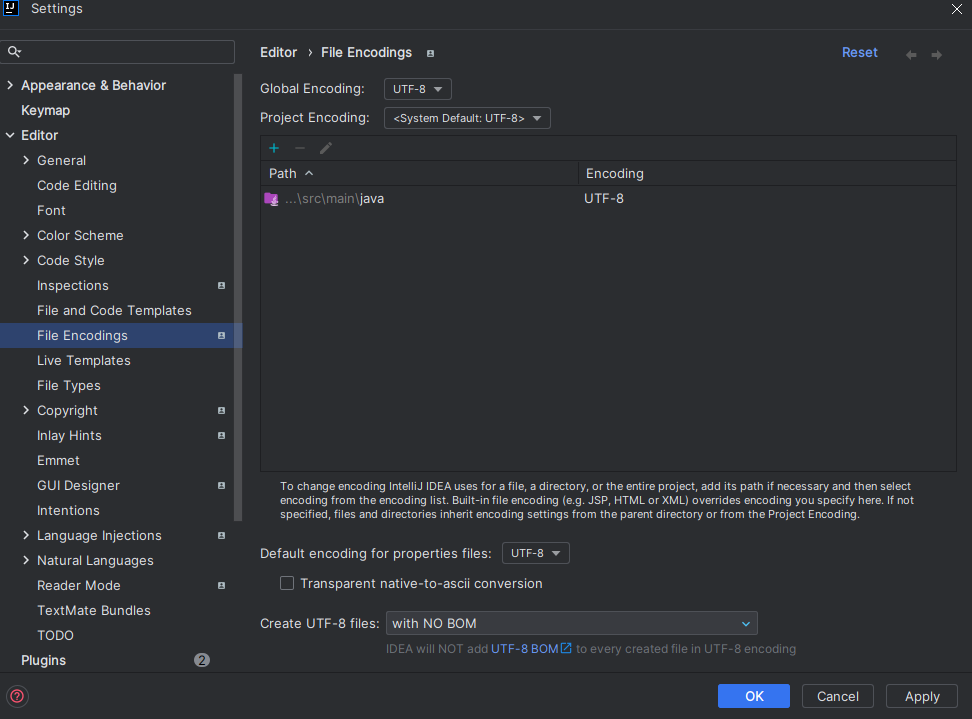
- IntelliJ의 경우 Settings - Editor - File Encodings에서
Default encoding for properties files의 encoding type을UTF-8로 변경한다.
src/main/resources/에messages.properties파일을 생성하고, key와 value를 입력한다.
# src/main/resources/messages.properties
welcome=환영합니다
greeting=안녕하세요
- HTML 파일에서 텍스트 표현식을 입력하고 결과를 확인한다.
<p th:text="#{welcome}">Welcome</p>
<p th:text="#{greeting}">Greeting</p>

4. 조각 표현식 ~{}
- Thymeleaf 템플릿 fragment를 다른 템플릿에서 호출할 때 사용한다.
- 아래 예시는
src/main/resources/templates/fragments디렉터리 내의header.html파일의title이라는 이름의 fragment를 현재 템플릿에 넣는다.- Layout과 Fragment 참고.
<div th:insert="~{path/fileName :: fragName}"></div>

<div th:insert="~{fragments/header :: title}"></div>
5. 텍스트 대체 표현식 ||
- 탬플릿 대상이 되는 HTML 텍스트 일부를 동적으로 대체한다.
- 예시에선
<p>내의 텍스트를th:text의 내용으로 치환한다.
<!-- Hello, 이름 -->
<p th:text="|Hello, ${user.name}|">Hello</p>
6. 인라인 표현식(inline expression)
참고 자료 : Thymeleaf Inlining
[[${...}]]으로 사용한다.
<p>Hello, [[${user.name}]]</p>

<!-- 위와 같은 결과 -->
<p th:text="'Hello, ' + ${user.name}"></p>
- Natural Template 처리 :
/*[[${...}]]*/로 사용하며, 내부에 Thymeleaf 표현식을 작성하고, 뒤에는 기본값을 작성한다.
/*[[${user.name}]]*/ "Default User"
1) Javascript inlining
- JavaScript에서
Model객체가 보유한 값을 할당하여 사용할 때 인라인 표현식을 사용한다. script태그에th:inline="javascript"를 추가한다.
<script type="text/javascript" th:inline="javascript">
	let userName = [[${user.name}]];
	console.log(userName);
</script>
- Natural Template
/*[[${...}]]*/사용 시 인라인 표현식과 기본값을 할당한다.
<script type="text/javascript" th:inline="javascript">
	let userName = /*[[${user.name}]]*/ "testname";
	console.log(userName);
</script>
2) CSS inlining
style태그에th:inline="css"를 추가한다.- 참고 자료 : Thymeleaf CSS inlining
// 데이터 형식 예시
classname = 'box'
align = 'center'
<style th:inline="css">
    .[[${classname}]] {
      text-align: [[${align}]];
    }
</style>
<!-- 결과 -->
<style th:inline="css">
    .box {
      text-align: center;
    }
</style>
- CSS에도 Natural Template을 적용할 수 있다.
<style th:inline="css">
    .[[${classname}]] {
      text-align: /*[[${align}]]*/ left;
    }
</style>
문법
1. th:text와 th:utext
- JSP의 EL 표현식인
${}를 사용해서 Controller에서 전달 받은 데이터에 접근할 수 있다. th:text는${..}을 해석해서 태그의 텍스트로 표현한다.th:utext는 텍스트를 HTML로 해석하여 삽입한다.- XSS 공격에 유의해야 한다.
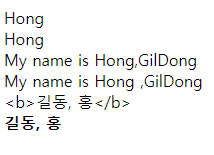
// controller
@RequestMapping("/")
public String ex01(Model model) {
	model.addAttribute("lastName", "Hong");
	model.addAttribute("firstName", "GilDong");
	return "ex01";
}
<div th:text="${lastName}">lee, 더미 데이터</div>
<div>[[${lastName}]]</div>
<!-- 문자열 결합과 리터럴 치환 -->
<span th:text="'My name is ' + ${lastName} + ',' + ${firstName}"></span>
<br>
<span th:text="|My name is ${lastName} ,${firstName}|"></span>
<br>
<!-- th:utext는 <,>를 <, >로 변환하지 않고 그대로 출력 -->
<span th:text="${'<b>길동, 홍</b>'}">lastName, firstName</span>
<br>
<span th:utext="${'<b>길동, 홍</b>'}">lastName, firstName</span>
<br>
2. th:if와 th:unless
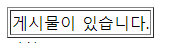
- 조건문에 해당하는 속성으로, if는 조건이 참이면 렌더링을 수행하고, unless는 조건이 참일 때 렌더링을 수행하지 않는다.
- if와 else 관계와 비슷하다.
// controller
@RequestMapping("/ex02")
public String ex02(Model model) {
	ArrayList<Integer> list = new ArrayList<Integer>();
	list.add(1);
	model.addAttribute("list", list);
	model.addAttribute("userNum", 3);
	model.addAttribute("grade", "D");
	return "ex02";
}
<!-- jsp -->
<table border="1">
	<!-- 조건이 참이면 렌더링 -->
	<tr th:if="${list.size()}==0">
		<td>게시물이 없습니다.</td>
	</tr>
	<!-- 조건이 참이면 렌더링x -->
	<tr th:unless="${list.size()}==0">
		<td>게시물이 있습니다.</td>
	</tr>
</table>
3. th:switch, th:case, th:block
- Java의 switch, case문과 동일하다.
th:block는 thymeleaf에서 자체적으로 제공하는 블록 태그로,th:block에 제어할 태그를 설정하고 코드를 작성
// controller
@RequestMapping("/ex02")
public String ex02(Model model) {
	ArrayList<Integer> list = new ArrayList<Integer>();
	list.add(1);
	model.addAttribute("list", list);
	model.addAttribute("userNum", 3);
	model.addAttribute("grade", "D");
	return "ex02";
}
<!-- jsp -->
<th:block th:switch="${userNum}">
	<span th:case="1">권한1</span>
	<span th:case="2">권한2</span>
	<span th:case="3">권한3</span>
</th:block>

<div th:switch="${grade}">
	<span th:case="A">특급</span>
	<span th:case="B">고급</span>
	<span th:case="C">중급</span>
	<span th:case="*">기타</span>
</div>

4. th:each
- JSTL의
<c:forEach>, Java의 forEach 반복문과 동일하다. ${list}로부터 받아온 원소를 변수로 대입하여 사용하고, 변수 이름은 원하는 대로 사용 가능하다.
// controller
@RequestMapping("/ex03")
public String ex03(Model model) {
	ArrayList<String> list = new ArrayList<String>();
	list.add("apple");
	list.add("바나나");
	list.add("딸기");
	list.add("grape");
	list.add("자두");
	model.addAttribute("list", list);

	return "ex03";
}
<!-- jsp -->
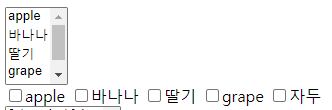
<select multiple>
	<option th:each="opt:${list}" th:value="${opt}">[[${opt}]]</option>
</select>

<div>
<th:block th:each="opt:${list}">
	<input type="checkbox" th:value="${opt}">[[${opt}]]
</th:block>
</div>
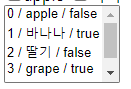
- state 변수 :
th:each를 사용 시 반복 상태를 추적할 수 있는 status 변수 제공한다.
| state 객체 속성 | 설명 |
|---|---|
| index | 0부터 시작하는 index 값 |
| count | 1부터 개수를 카운트 |
| size | 요소의 개수 |
| current | 현재 요소를 알려줌 |
| even | 현재 반복이 짝수번째인지 boolean으로 알려줌 |
| odd | 현재 반복이 홀수번째인지 boolean으로 알려줌 |
| first | 현재 반복이 첫 번째인지 boolean으로 알려줌 |
| last | 현재 반복이 마지막인지 boolean으로 알려줌 |
<!-- jsp -->
<select multiple>
	<option th:each="opt, status:${list}" th:value="${opt}">
	[[${status.index}]] / [[${opt}]] / [[${status.even}]]
	</option>
</select>
5. th:object
- controller에서 보낸 객체를 가져와 해당 객체의 속성을 바로 사용할 수 있다.
// controller
@RequestMapping("/ex04")
public String ex04(Model model) {
	model.addAttribute("user", new UserDTO("길동", 40));
	return "ex04";
}
<!-- jsp -->
<!DOCTYPE html>
<html lang="en" xmlns:th="http://www.thymeleaf.org">
<head>
<meta charset="UTF-8">
<title>Insert title here</title>
</head>
<body th:object="${user}">
	<h1>회원 정보 출력 예제</h1>
	<div>
		<p>이름 : <span th:text="*{name}"></span></p>
		<p>나이 : <span th:text="*{age}"></span></p>
	</div>
</body>
</html>

6. th:attr, th:attrappend, th:attrprepend
th:attr은 속성의 값을 설정할 때 사용하며,th:attr="속성이름=값"으로 작성한다.
<img src="images/dummy.png" th:attr="src=@{images/cat.png}">
- 대부분의 속성은
th:속성이름으로 표현할 수 있다.th:value,th:src,th:href등
<img src="images/dummy.png" th:src="@{images/cat.png}">

<input type="text" th:value="${member.email}" placeholder="이메일">
th:attrappend는 해당 속성의 뒤에 속성 값을 추가할 때 사용하고,th:attrprepend는 해당 속성의 앞에 속성 값을 추가할 때 사용한다.
<!-- th:attrappend : 속성 뒤에 속성값 추가 -->
<input type="button" value="Go" class="btn" th:attrappend="class=${''+style}"/>
7. th:field
th:field은id,name,value속성을 자동으로 처리한다.form에서 여러 값을 받을 때th:object와th:field를 사용하여 많은 필드 값을 묶어 자동으로 Java 객체와 연결한다.
@Controller
public class TestController {
	@PostMapping("/add")
	public String add(
		@ModelAttribute ProductDTO dto,
		Model model
	) {
		// form으로 받은 데이터가 자동으로 ProductDTO에 바인딩됨
		// 바인딩된 객체를 새 페이지에 Model 객체에 바인딩
		model.addAttribute("product", dto);
		return "success"; // success.html
	}
}
<form th:action="@{/add}" th:object="${productDTO}"
method="post">
	<!-- name을 productDTO의 productName으로 자동 설정 -->
	<input th:type="text" th:field="*{name}"
	placeholder="상품 이름">
	<input th:type="text" th:field="*{stock}"
	placeholder="수량">
</form>
- 위에서
th:field는 아래 코드와 같이 변환된다.
<input type="text"
	id="name"
	name="name"
	value="객체 기존값"
>
8. th:replace와 th:insert
th:insert는 현재 태그 내에 fragment를 추가한다.
<div th:insert="~{path/filename :: fragName}"></div>
th:replace는 태그 요소를 완전히 대체한다.
<div th:replace="~{path/filename :: fragName}"></div>
src/main/resources/templates/fragment/폴더에header.htmlfragment 파일을 생성한다.
<!-- header.html -->
<div th:fragment="simple"
style="border: 1px solid red;">
    <h2>헤더 조각입니다.</h2>
</div>
- 다른 HTML 파일에서
th:replace와th:insert로 fragment 파일 내의th:fragment를 가져온다.
<!-- test.html -->
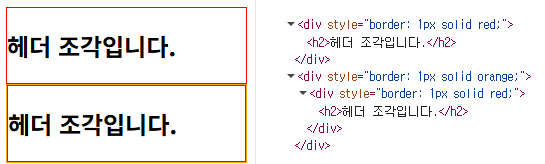
<div th:replace="~{fragment/header :: simple}"
     style="border: 1px solid orange;">대체하기</div>
<div th:insert="~{fragment/header :: simple}"
     style="border: 1px solid orange;">추가하기</div>
th:replace는 태그 요소를 완전히 대체하기에 테두리가 빨간 색인 header 조각만 남아있고,th:insert는 현재 태그 내에 fragment를 추가하기에 오렌지 색div내에 빨간색 header가 추가되어 있다.
utility 객체
- 유용한 메소드를 제공하는 객체들이며, 변환 및 형식화를 쉽게 해준다.
| 타입 | 객체 |
|---|---|
| 문자열 | #strings, #numbers |
| 날짜, 시간 | #dates, #calendars, #temporals |
| 배열, 컬렉션 | #arrays, #lists, #sets, #maps |
#numbers.sequence(start, end): 시작부터 종료까지 순차적으로 증가하는 시퀀스 생성#strings.substring(str, start, end): 대상 string을 시작부터 종료까지 자름
기본객체(지원x)
- 현재는 request, session, servletContext 기본 객체를 지원하지 않는다.
// controller
@GetMapping("/ex03")
public String ex03(Model model, HttpServletRequest request) {
	request.setAttribute("year", 2024);
	HttpSession session = request.getSession();
	session.setAttribute("id", "asdf");
	ServletContext application = session.getServletContext();
	application.setAttribute("email", "service@gmail.com");

	return "ex03";
}
 <h1 th:text="|year : ${year}|"></h1>
 <h1 th:text="|id : ${session.id}|"></h1>
 <h1 th:text="|email : ${application.email}|"></h1>

<!-- 더 이상 request, session, servletContext 기본 객체를 지원하지 않음 -->
<!-- 	 <h1 th:text="${#request.getAttribute('year')}"></h1> -->
<!-- 	 <h1 th:text="${#session.getAttribute('id')}"></h1> -->
<!-- 	 <h1 th:text="${#servletContext.getAttribute('email')}|"></h1> -->